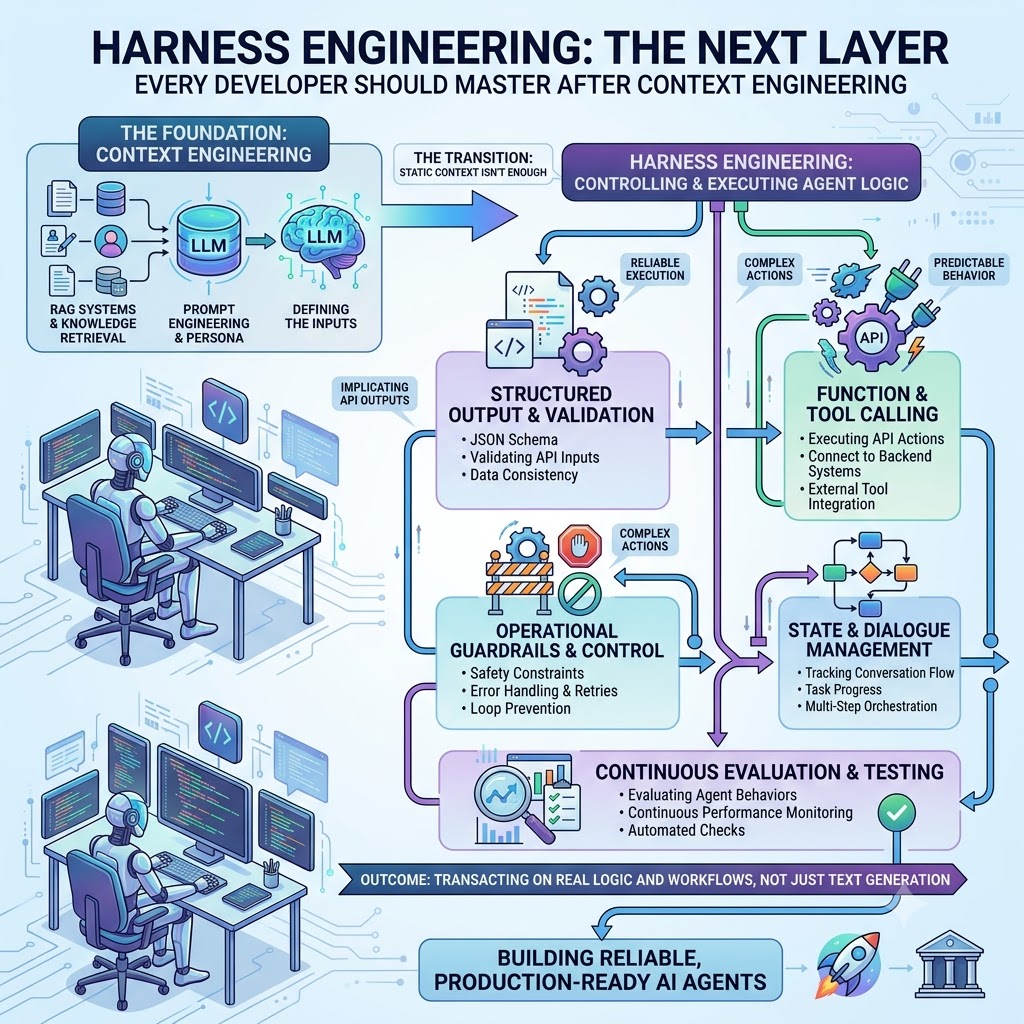
Generated AI image by Google Gemini Nano Banana
Introduction
You’ve learned to write better prompts. You’ve learned to structure context. Now it’s time to think about what turns a model into an agent — and what keeps that agent under control once it’s running.
What Is Harness Engineering?
In my previous article, I mentioned context engineering quite a bit and how it’s important for developers to master in this AI era we’re in. If you’ve spent time on context engineering, you already understand one truth: the quality of what you give an AI model matters as much as the model itself.
Harness engineering is the discipline that comes next — and it’s a bigger shift than it first sounds.
Context engineering answers what do I put in the prompt? Harness engineering answers a different question: how does the model actually act — calling tools, tracking state across steps, staying inside guardrails — and how do I control that?
A harness is the runtime infrastructure that turns a model into an agent. It’s everything outside the model weights themselves: the tool-calling layer, the state and conversation tracking across multi-step tasks, the guardrails that stop an agent from looping or taking an unsafe action, and the evaluation loop that tells you whether the agent is actually working.
The simplest way to say it: the model is the brain, the harness is the hands. A frontier model with no harness is a very smart thing that can only talk. A harness is what lets it act — call your APIs, execute multi-step workflows, hold state across a task, and be observed and corrected in production.
Static context isn’t enough once a model needs to do something rather than just say something. That’s the transition harness engineering is built for.
Why This Matters Now
AI agents are no longer demos. They’re executing real workflows — calling backend APIs, orchestrating multi-step tasks, running in CI pipelines, financial systems, and customer-facing tools, often with no human checking every step.
That shift changes the engineering contract.
When an agent is a demo, one wrong tool call is a funny anecdote. When it’s in production, one wrong tool call is a defect category — or an incident. An agent that gets stuck in a tool-calling loop, silently drifts off task, or calls a destructive API with malformed arguments isn’t a prompting problem. It’s a harness problem.
This is also, deliberately, the layer prompt engineering and context engineering both live inside of. Prompt and context engineering shape what the model sees and how it reasons. Harness engineering decides what the model is allowed to do with that reasoning — and it’s increasingly seen as the next phase of AI engineering maturity, following prompt engineering and context engineering.
The Anatomy of an Agent Harness
There’s no single, universally agreed decomposition of a harness yet — this is a fast-moving area, and different teams and labs slice it slightly differently. What follows is one useful way to organise the concerns, drawing on the common ground across current practice. You don’t need all five for every use case, but you should make a conscious decision about each one.
1. Structured Output & Validation
Before your harness lets the model’s output become an action, it has to ask: is this actually usable?
This starts with the model’s own output — is it valid JSON, does it match the schema you need — and extends to validating the inputs it wants to send onward, whether that’s a tool call’s arguments or a downstream API payload.
Practical starting points:
- Validate tool-call arguments against a schema before execution, not after
- Reject or repair malformed structured output rather than silently passing it through
- Check data consistency between what the model says it did and what it’s actually about to do
- Define what “invalid output” means for your use case and handle it explicitly
from pydantic import BaseModel, ValidationError

class ToolCall(BaseModel):
    tool_name: str
    arguments: dict
    reasoning: str

def validate_tool_call(raw_output: str) -> ToolCall:
    try:
        data = json.loads(raw_output)
        return ToolCall(**data)
    except json.JSONDecodeError:
        raise ToolCallParseError(f"Model returned non-JSON tool call: {raw_output[:200]}")
    except ValidationError as e:
        raise ToolCallValidationError(f"Tool call failed schema validation: {e}")
2. Function & Tool Calling
This is where an agent stops being a chatbot and starts being able to act.
Your harness is responsible for the tool registry (what the agent is allowed to call), executing the actual API action once a tool call is validated, and returning the result back into the agent’s context in a form it can reason about on the next step.
Key practices:
- Keep the tool registry explicit and versioned — don’t let an agent discover capabilities it wasn’t scoped to have
- Separate “the model decided to call a tool” from “the tool was actually executed” — these are different trust boundaries
- Log every tool invocation with its arguments and result, not just the model’s final answer
async def execute_tool_call(tool_call: ToolCall, registry: ToolRegistry) -> ToolResult:
    if tool_call.tool_name not in registry:
        return ToolResult.rejected(f"Unknown tool: {tool_call.tool_name}")

    tool = registry[tool_call.tool_name]
    try:
        output = await tool.execute(**tool_call.arguments)
        return ToolResult.success(output)
    except ToolExecutionError as e:
        return ToolResult.failure(str(e))
3. Operational Guardrails & Control
Guardrails are constraints your harness enforces independently of the model’s own judgement — a defence-in-depth layer you should not rely on the model alone to provide, especially in production.
For agents specifically, this includes a failure mode that doesn’t exist for a single call: loop prevention. An agent that can call its own tools and re-evaluate its plan can, without a hard stop, call the same tool repeatedly, burn budget, or spiral without making progress.
Guardrails to define explicitly:
- Step and loop limits — a hard ceiling on how many tool calls or reasoning steps a single task can take
- Safety constraints — actions the agent is never allowed to take regardless of what it reasons its way into (e.g. destructive operations, financial transfers)
- Error handling & retries — exponential backoff with jitter for transient tool failures, distinct from giving up and escalating
- Confidence/latency budgets — a defined behaviour when a step hasn’t resolved within your time or certainty threshold, rather than hanging indefinitely
class LoopGuard:
    def __init__(self, max_steps: int = 10):
        self.max_steps = max_steps
        self.step_count = 0

    def check(self) -> None:
        self.step_count += 1
        if self.step_count > self.max_steps:
            raise LoopLimitExceeded(f"Agent exceeded {self.max_steps} steps without completion")
4. State & Dialogue Management
A single AI call has no memory problem — you send the messages, you get a response. An agent running a multi-step task does. Your harness has to track conversation flow, task progress, and the results of prior tool calls, and feed the right slice of that back into context on each step without letting it balloon indefinitely.
- Track task state (what’s been done, what’s pending) separately from raw conversation history
- Decide explicitly what gets summarised or dropped as a task grows long, rather than letting context silently fill up
- Persist state across sessions if the task can be paused and resumed
class AgentState:
    def __init__(self, task_id: str):
        self.task_id = task_id
        self.completed_steps: list[dict] = []
        self.pending_steps: list[str] = []

    def record_step(self, tool_call: ToolCall, result: ToolResult) -> None:
        self.completed_steps.append({
            "tool": tool_call.tool_name,
            "result": result.summary(),
        })
5. Continuous Evaluation & Testing
If you cannot see what your agent is doing in production, you cannot improve it and you cannot trust it.
This goes further than logging latency and token counts for a single call — you need to evaluate agent behaviour: did it choose the right tool, did it stop when it should have, did the task actually succeed end to end. This is the “eval harness” layer — a fixed set of scenarios you can run against a given agent configuration to catch regressions before they reach production.
import structlog

logger = structlog.get_logger()

async def run_agent_step(state: AgentState, tool_call: ToolCall, correlation_id: str) -> ToolResult:
    logger.info("tool_call_start", correlation_id=correlation_id,
                task_id=state.task_id, tool=tool_call.tool_name)

    result = await execute_tool_call(tool_call, registry)

    logger.info("tool_call_complete", correlation_id=correlation_id,
                task_id=state.task_id, tool=tool_call.tool_name, success=result.success)

    return result
At minimum, instrument: per-step latency, tool-call success/failure rates by tool, loop-limit triggers, and downstream task success rate — not just whether the model returned a response, but whether the agent’s actions actually resolved the task.
A Minimal Working Agent Harness
Here’s the shape of these five concerns assembled — not meant to be copy-pasted directly, but to show where each concern lives and what happens when it fails.
class AgentHarness:
    def __init__(self, config: HarnessConfig, registry: ToolRegistry):
        self.config = config
        self.registry = registry
        self.loop_guard = LoopGuard(max_steps=config.max_steps)
        self.logger = structlog.get_logger()

    async def run(self, task_input: str, context: RequestContext) -> HarnessResult:
        correlation_id = context.correlation_id
        state = AgentState(task_id=context.task_id)

        while not state.is_complete():
            # 1. Guardrail: loop/step limit
            try:
                self.loop_guard.check()
            except LoopLimitExceeded as e:
                return HarnessResult.guardrail_blocked(str(e))

            # 2. Model proposes next action
            raw_output = await call_model(assemble_prompt(state, context))

            # 3. Structured output validation
            try:
                tool_call = validate_tool_call(raw_output)
            except (ToolCallParseError, ToolCallValidationError) as e:
                self.logger.warning("tool_call_invalid", correlation_id=correlation_id, error=str(e))
                return HarnessResult.fallback(get_fallback_response())

            # 4. Function & tool calling
            result = await run_agent_step(state, tool_call, correlation_id)

            # 5. State management
            state.record_step(tool_call, result)

        return HarnessResult.success(state)
The Connection to Context Engineering
| Context Engineering | Harness Engineering |
|---|---|
| What goes in the prompt | How the agent’s actions get executed and controlled |
| How to structure examples | How to validate a tool call before it runs |
| How to frame instructions | How to stop an agent that’s stuck in a loop |
| What context to retrieve | How to track state across a multi-step task |
| How to format output | How to evaluate whether the agent’s actions actually worked |
They’re two lenses on the same problem, at different points in the pipeline: how do you make an AI system behave predictably in a system you’re responsible for? Context engineering shapes what the model reasons over. Harness engineering governs what it’s allowed to do with that reasoning.
What to Build Next
If you have an agent running in production (or approaching it), here’s a practical checklist:
Short term (this sprint):
- Add a hard step/loop limit — know what happens when an agent doesn’t converge
- Add structured logging with correlation IDs to every tool call, not just the final response
- Add a fallback — a defined “stop and escalate” path is better than a hanging or looping task
Medium term (next month):
- Add schema validation for every tool call’s arguments, not just the final output
- Build explicit state tracking separate from raw conversation history
- Build a basic dashboard for tool-call success rate, loop-limit triggers, and task completion rate
Longer term:
- Build an eval harness to test agent behaviour changes before shipping them
- Formalise your tool registry and versioning so agent capabilities are explicit, not discovered
- Connect downstream task-success signals back to the specific harness configuration that produced them
Closing Thought
Context engineering is about crafting the right input. Harness engineering is about building the system that decides what the model is allowed to do with it — which tools it can call, how far it can run before something checks in, and how you’ll know if it actually worked.
The developers who ship reliable agents in 2026 won’t just be good prompt engineers. They’ll be engineers who understand where an agent’s actions can go wrong at each step, and who build the scaffolding that makes those actions observable, bounded, and testable.
That scaffolding is the harness. And building it well is an engineering discipline, not an afterthought.
Till next time, Happy coding and keep learning!
References
- Rick Hightower, “Harness Engineering vs Context Engineering: The Model is the CPU, the Harness is the OS,” Spillwave, March 17, 2026.
- NxCode Team, “What Is Harness Engineering? Complete Guide for AI Agent Development (2026),” NxCode, March 26, 2026.
- Birgitta Böckeler, “Harness Engineering for Coding Agent Users,” martinfowler.com, April 2, 2026.
- Vivek Trivedy, “The Anatomy of an Agent Harness,” LangChain Blog, March 10, 2026.
- Vivek Trivedy, “Improving Deep Agents with Harness Engineering,” LangChain Blog, February 17, 2026.